Agent 安装
Agent 是一个跑在你自己机器(笔记本、VPS、开发容器)上的 Node.js 进程,通过 WebSocket 连到 Yeaft 服务器。一个 Agent 进程能同时处理三种后端 —— Claude Code、Copilot、Yeaft Code Agent —— 具体哪几个可用,取决于本机装了哪些 CLI。
前置要求
手动安装需要 Node.js 22.5+;一键安装会检查 Node.js/npm,缺失或不兼容时安装独立的用户级 Node 24。下表的 CLI 都不是必须的 —— 你想用哪种后端就装哪个:
| 后端 | 必需 CLI | 安装方式 |
|---|---|---|
| Claude Code 聊天 | Claude Code CLI(claude 命令,已登录) | npm install -g @anthropic-ai/claude-code,然后 claude login |
| Copilot 聊天 | GitHub Copilot CLI(copilot 命令,已 GitHub 鉴权) | gh extension install github/gh-copilot 或者独立的 Copilot CLI,然后 copilot auth login |
| Yeaft Code Agent | 无 —— 引擎随 npm 包一起发;需要在当前 Agent instance 的 config.json 配置至少一个 LLM provider | 见 Yeaft 引擎配置 |
Agent 启动时会做能力检测,只把本机能跑通的后端暴露出来 —— 比如本机没装 Copilot CLI,新建会话弹窗里就不会出现 Copilot 选项。
一键安装(推荐)
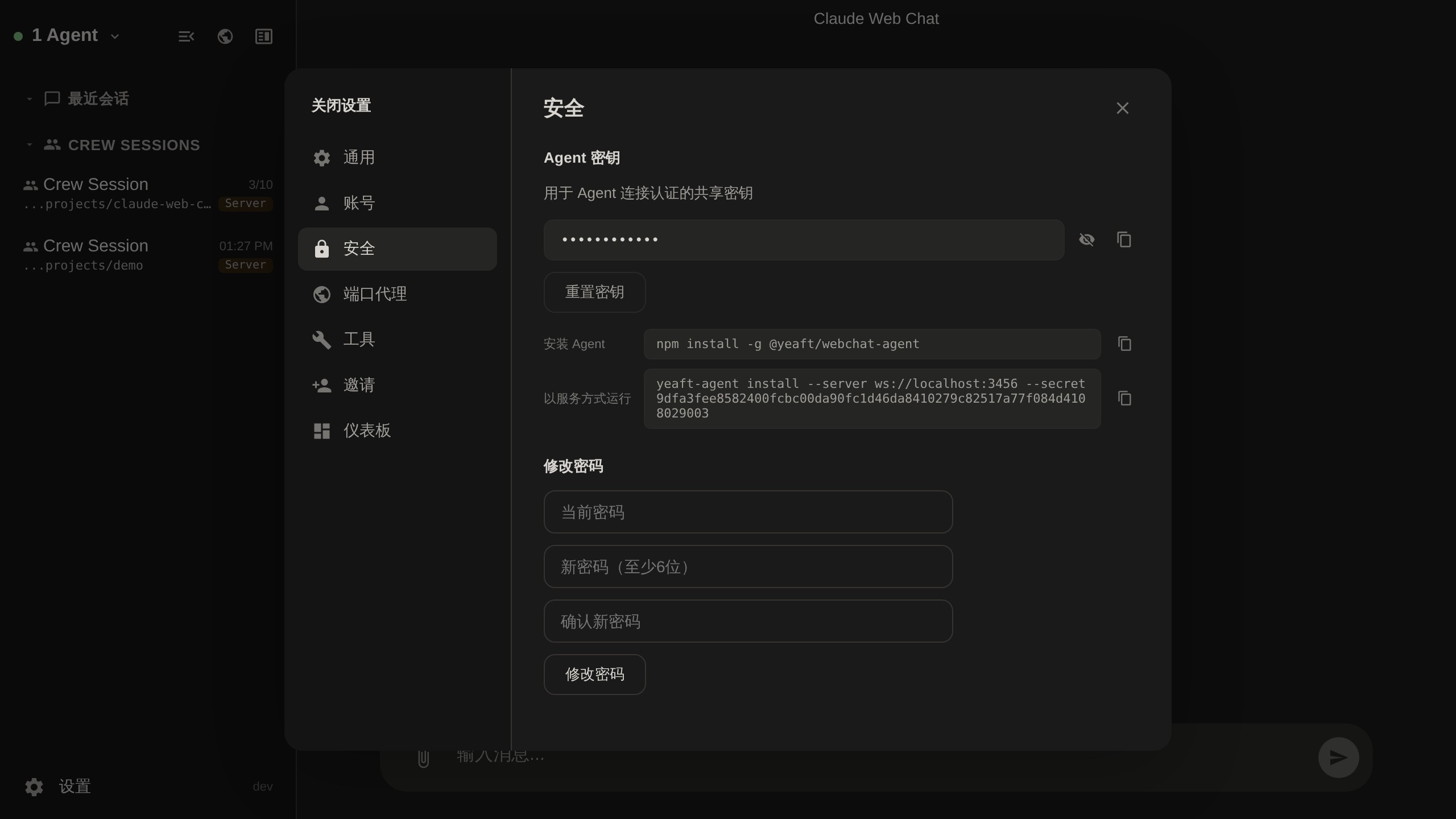
在当前服务器的 设置 → 安全 或首次连接引导中,选择 Linux / macOS 或 Windows PowerShell,点击 复制安装命令,再粘贴到目标机器的终端执行。完整命令默认折叠,可展开 查看命令 检查内容;剪贴板访问失败时会自动展开,方便手动复制。命令自动带入当前服务器地址和你的 Agent Secret;无需手动安装 npm 包或填写机器名。
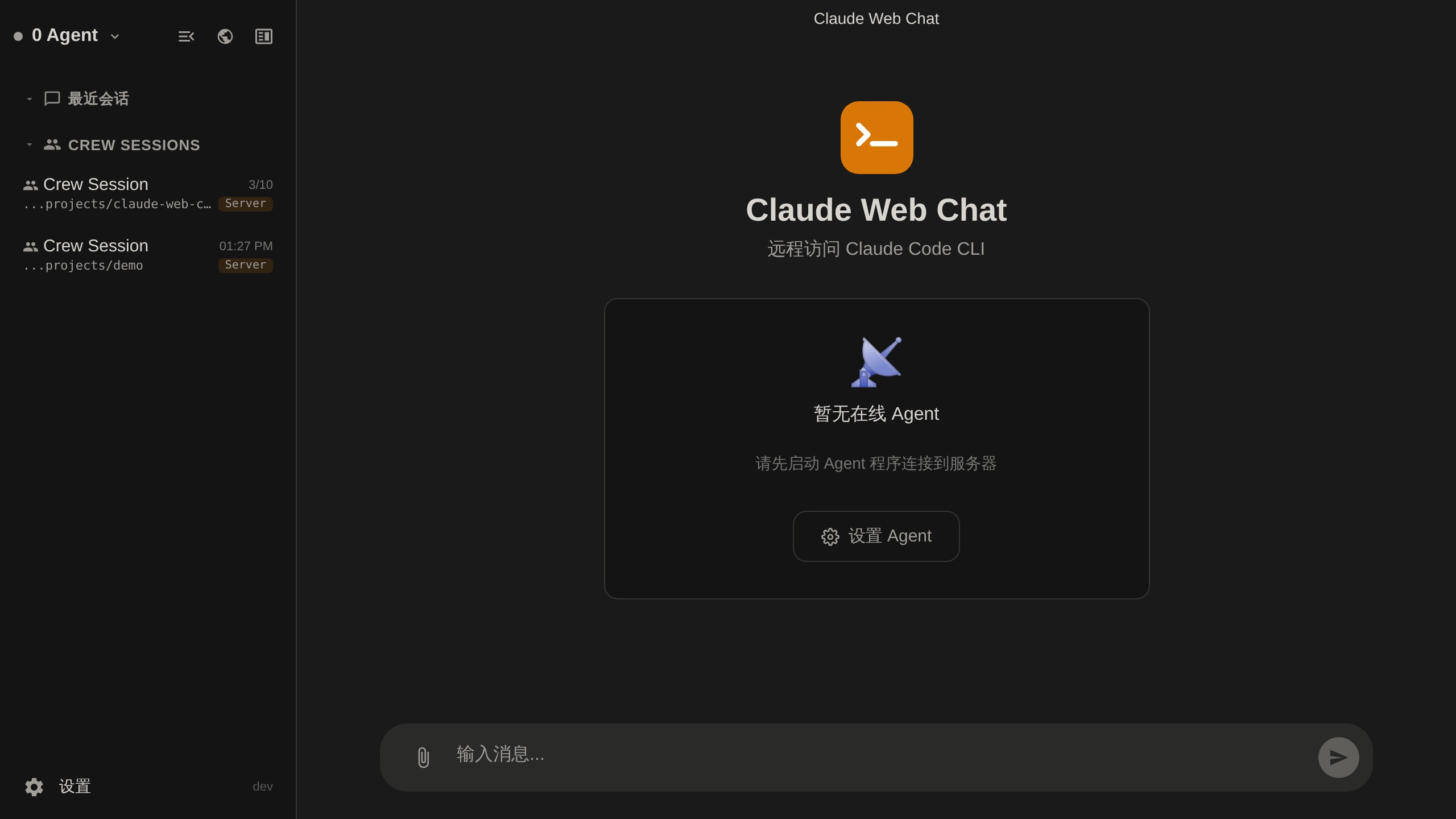
没有在线 Agent 且未打开会话时,首页只显示接入引导,不展示消息输入框或没有命令的模型配置步骤。Agent 连接后恢复普通欢迎页和输入框;Agent 离线不影响已有会话的查看。
Linux / macOS 示例(将示例地址和 Secret 换成实际值):
(tmp=$(mktemp) && trap 'rm -f "$tmp"' EXIT && curl -fSL --proto '=https' --proto-redir '=https' --tlsv1.2 'https://your-server.com/installers/install.sh' -o "$tmp" && sh "$tmp" --server 'wss://your-server.com' --secret 'YOUR_AGENT_SECRET')Windows PowerShell 5.1+ 示例:
& { param($Server, $Secret) $tls = [Net.ServicePointManager]::SecurityProtocol; try { [Net.ServicePointManager]::SecurityProtocol = $tls -bor [Net.SecurityProtocolType]::Tls12; & ([scriptblock]::Create((Invoke-WebRequest -UseBasicParsing 'https://your-server.com/installers/install.ps1' -MaximumRedirection 0 -ErrorAction Stop).Content)) -Server $Server -Secret $Secret } finally { [Net.ServicePointManager]::SecurityProtocol = $tls } } -Server 'wss://your-server.com' -Secret 'YOUR_AGENT_SECRET'两个入口都先完整下载脚本再执行。也可以先下载、检查脚本,再使用相同参数执行;只运行你信任的服务器提供的脚本,公网部署使用 HTTPS。
安装行为:
- 合格的现有 Node.js/npm 会被复用;否则从
nodejs.org下载 Node 24,并在解压前校验官方 SHA-256。不会通过sudo、Homebrew 或系统安装器替换已有 Node,不修改系统 PATH 或 npm 全局配置。 - 安装实际 npm 包
@yeaft/webchat-agent,使用独立的用户级目录~/.yeaft/installations/<机器名-四位随机数>/。同一条命令重复运行会新增实例,而不是升级或重启已有 Agent。 - npm 新装默认使用
ONNXRUNTIME_NODE_INSTALL_CUDA=skip跳过额外 CUDA 包,保留调用者非空覆盖;默认值只作用于 npm,不写入 Agent 服务环境。 - 自动运行
yeaft-agent install,注册并启动当前用户的后台服务。Linux 需要可用的 systemd 用户会话;macOS 使用 launchd;Windows 使用 PM2 并在登录时恢复。Linux 退出登录后继续运行仍可能需要管理员启用 linger,脚本不会自行提权。 - 命令参数中的 Secret 不会放入脚本下载 URL,也不会作为安装进度输出。命令本身包含凭据,可能留在剪贴板、终端历史或进程参数中;不要分享,泄露后请在设置中重置。
- 安装结束会输出该实例的管理命令。私有安装不向系统 PATH 添加
yeaft-agent;升级请使用 Web UI 的实例级安全升级(管理入口会拒绝独立upgrade,避免修改全局包);请使用输出的绝对路径命令,或在 Web UI 管理已连接 Agent。LLM provider 和 Claude/Copilot CLI 的账号登录仍按需单独配置。
手动 npm 安装
Linux / macOS(POSIX shell):
ONNXRUNTIME_NODE_INSTALL_CUDA=skip npm install -g @yeaft/webchat-agentWindows PowerShell(无论成功失败都恢复原值):
$previousCuda = $env:ONNXRUNTIME_NODE_INSTALL_CUDA
try {
  $env:ONNXRUNTIME_NODE_INSTALL_CUDA = 'skip'
  npm install -g @yeaft/webchat-agent
} finally {
  $env:ONNXRUNTIME_NODE_INSTALL_CUDA = $previousCuda
}
直接 npm 安装不会自动继承一键安装器的 CPU 策略。变量只跳过额外 CUDA 下载,不禁用原生依赖安装脚本;不要用 --ignore-scripts 代替。安装仍会下载可选 Transformers/ONNX CPU 依赖;可选依赖失败或省略时,Recall 明确降级,不伪造语义结果。
这与模型权重下载不同:首次显式非空 Recall 才下载固定版本 CPU 模型到 <yeaftDir>/person/models。YEAFT_PERSON_EMBEDDING_DOWNLOAD=0 禁止模型下载,完整缓存可用;YEAFT_PERSON_EMBEDDING=off 禁用 embedding,二者不控制 npm 安装。源码 npm install/npm ci 同样需要此 POSIX 前缀或上述 PowerShell 环境块。
安装后运行:
# 前台运行。--name 可省略,默认使用计算机名,其中非法字符替换为 "-"。
yeaft-agent --server wss://your-server.com --secret your-secret

# 或安装为系统服务(开机自启、崩溃自重启)
yeaft-agent install --server wss://your-server.com --secret your-secret

# 管理已安装的服务
yeaft-agent status                 # 查看运行状态
yeaft-agent logs                   # 查看日志(跟踪模式)
yeaft-agent restart                # 重启
yeaft-agent uninstall              # 卸载服务
从源码运行
开发环境或不使用 npm 全局安装:
cd agent
cp .env.example .env
# 编辑 .env — 设置 SERVER_URL, AGENT_NAME, AGENT_SECRET, WORK_DIR

# 前台运行
node index.js

# 或安装为系统服务(自动读取 .env 配置)
node cli.js install

# 管理已安装的服务
node cli.js status
node cli.js logs
node cli.js uninstall
查找 Agent Secret
Agent Secret 可在 Web 界面的 设置 > 安全 中找到:
当没有 Agent 连接时,首页会引导你前往设置页面:
验证后端是否可用
Agent 连接成功后,打开 Web UI 新建一个会话:
- Claude Code 选项消失 → 说明 agent 机器上
claude --version不能跑,或 Claude CLI 没登录 - Copilot 选项消失 → 说明 agent 机器上
copilot --version不能跑,或 Copilot CLI 没鉴权 - Yeaft Code Agent 选项始终在 —— 引擎已经打包,但所选 Agent instance 的 resolved
config.json仍需至少一个 provider
Yeaft 引擎配置详见 Yeaft 引擎配置。