Agent Setup
The Agent is a Node.js process that runs on a machine you control (your laptop, a VPS, a dev container) and connects to the Yeaft server over WebSocket. One Agent process can handle all three backends — Claude Code chat, Copilot chat, and Yeaft Code Agent — depending on what CLIs are installed locally.
Prerequisites
Manual installation requires Node.js 22.5+. The one-line installer checks Node.js/npm and installs an isolated user-level Node 24 when they are missing or incompatible. None of the CLIs below are mandatory — install only the ones you want to use:
| Backend | Required CLI | How to install |
|---|---|---|
| Claude Code chat | Claude Code CLI (claude command, authenticated) | npm install -g @anthropic-ai/claude-code then claude login |
| Copilot chat | GitHub Copilot CLI (copilot command, GitHub auth) | install via gh extension install github/gh-copilot or the standalone Copilot CLI, then copilot auth login |
| Yeaft Code Agent | None — engine is bundled; configure at least one provider in this Agent instance's config.json | See Yeaft Engine Config |
The Agent capability-detects what's installed at startup and exposes only the backends that actually work — for example, if you don't have the Copilot CLI on this machine, the Copilot option won't show up in the new-session dialog.
One-line installation (recommended)
In Settings → Security or the first-connection guide on your server, select Linux / macOS or Windows PowerShell, click Copy install command, and paste it into a terminal on the target machine. The full command is collapsed by default; expand View command to inspect it or copy manually if clipboard access fails. It includes the current server address and your Agent Secret; you do not need to install the npm package or choose a machine name manually.
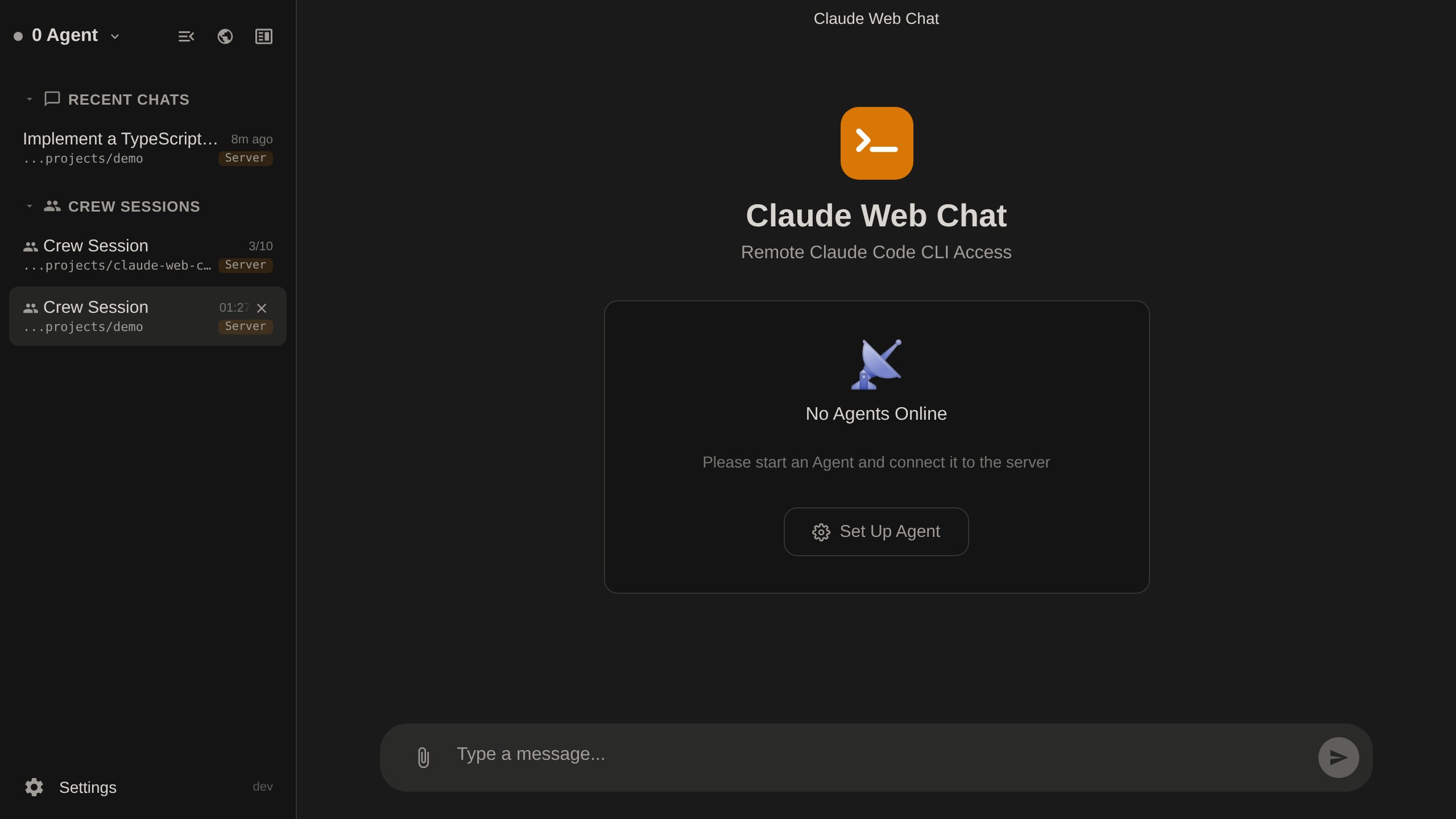
With no Agent online and no conversation open, the home page shows only setup guidance, without a message composer or empty model-configuration step. Once an Agent connects, the regular welcome page and composer return; existing conversations remain accessible while an Agent is offline.
Linux / macOS example (replace the sample host and Secret):
(tmp=$(mktemp) && trap 'rm -f "$tmp"' EXIT && curl -fSL --proto '=https' --proto-redir '=https' --tlsv1.2 'https://your-server.com/installers/install.sh' -o "$tmp" && sh "$tmp" --server 'wss://your-server.com' --secret 'YOUR_AGENT_SECRET')Windows PowerShell 5.1+ example:
& { param($Server, $Secret) $tls = [Net.ServicePointManager]::SecurityProtocol; try { [Net.ServicePointManager]::SecurityProtocol = $tls -bor [Net.SecurityProtocolType]::Tls12; & ([scriptblock]::Create((Invoke-WebRequest -UseBasicParsing 'https://your-server.com/installers/install.ps1' -MaximumRedirection 0 -ErrorAction Stop).Content)) -Server $Server -Secret $Secret } finally { [Net.ServicePointManager]::SecurityProtocol = $tls } } -Server 'wss://your-server.com' -Secret 'YOUR_AGENT_SECRET'Both commands download the complete script before executing it. You can also download and inspect it first, then run it with the same arguments. Only execute scripts from a server you trust; use HTTPS for public deployments.
Installation behavior:
- Reuses compatible Node.js/npm; otherwise downloads Node 24 from
nodejs.organd checks the official SHA-256 before extraction. It does not replace your Node throughsudo, Homebrew or a system installer, or change system PATH/global npm configuration. - Installs the actual npm package,
@yeaft/webchat-agent, in a private user directory,~/.yeaft/installations/<hostname-four-random-digits>/. Re-running the command creates a new instance, not an upgrade or restart of an existing Agent. - Defaults to CPU-only ONNX Runtime installation by setting
ONNXRUNTIME_NODE_INSTALL_CUDA=skiponly for npm installation. A nonempty caller-provided value is respected; deliberately opting into CUDA artifacts does not change Recall CPU inference. The script does not persist this default into your shell or Agent service. - Runs
yeaft-agent installto register and start a current-user background service. Linux requires a working systemd user session; macOS uses launchd; Windows uses PM2 with restoration at login. Linux may still require an administrator to enable linger for running after logout; the script does not elevate privileges. - The Secret is a script argument, never part of the download URL or installer progress output. The command contains credentials and may remain in your clipboard, shell history or process arguments. Do not share it; reset the key in Settings if exposed.
- The installer prints instance-specific management commands. Private installation does not add
yeaft-agentto system PATH; use the Web UI for instance-safe upgrades (the management wrapper rejects standaloneupgrade); use the printed absolute-path commands or manage the connected Agent in the Web UI. LLM providers and Claude/Copilot CLI account authentication remain separate, optional setup.
Manual npm installation
Linux / macOS (POSIX shell):
ONNXRUNTIME_NODE_INSTALL_CUDA=skip npm install -g @yeaft/webchat-agentWindows PowerShell (restore the previous setting even if installation fails):
$previousCuda = $env:ONNXRUNTIME_NODE_INSTALL_CUDA
try {
  $env:ONNXRUNTIME_NODE_INSTALL_CUDA = 'skip'
  npm install -g @yeaft/webchat-agent
} finally {
  $env:ONNXRUNTIME_NODE_INSTALL_CUDA = $previousCuda
}
The environment variable skips ONNX Runtime's extra CUDA artifact download, not native installation scripts. Do not use a blanket --ignore-scripts: native dependencies may need their lifecycle scripts. Installation still downloads optional npm dependencies (@huggingface/transformers, including ONNX Runtime and its CPU native binaries). Optional-dependency failure or omission results in an explicit Recall fallback rather than semantic results.
This is separate from Recall model downloads: only the first explicit, nonempty Recall may download the pinned CPU embedding model into <yeaftDir>/person/models. Page loading, ordinary startup and empty Recall do not download the model. YEAFT_PERSON_EMBEDDING_DOWNLOAD=0 prevents model downloads (cached models still work), and YEAFT_PERSON_EMBEDDING=off disables embeddings; neither setting suppresses npm dependency installation. Source installs should likewise prefix npm install / npm ci with ONNXRUNTIME_NODE_INSTALL_CUDA=skip in POSIX shells, or use the PowerShell environment block above.
After installation, on either platform:
# Run once. --name is optional; computer-name invalid characters become "-".
yeaft-agent --server wss://your-server.com --secret your-secret

# Or install as system service (auto-start on boot, auto-restart on crash)
yeaft-agent install --server wss://your-server.com --secret your-secret

# Manage installed service
yeaft-agent status                 # check if running
yeaft-agent logs                   # view logs (follow mode)
yeaft-agent restart                # restart
yeaft-agent uninstall              # remove service
From source
For development or without npm global install:
cd agent
cp .env.example .env
# Edit .env — set SERVER_URL, AGENT_NAME, AGENT_SECRET, WORK_DIR

# Run in foreground
node index.js

# Or install as system service (reads config from .env)
node cli.js install

# Manage installed service
node cli.js status
node cli.js logs
node cli.js uninstall
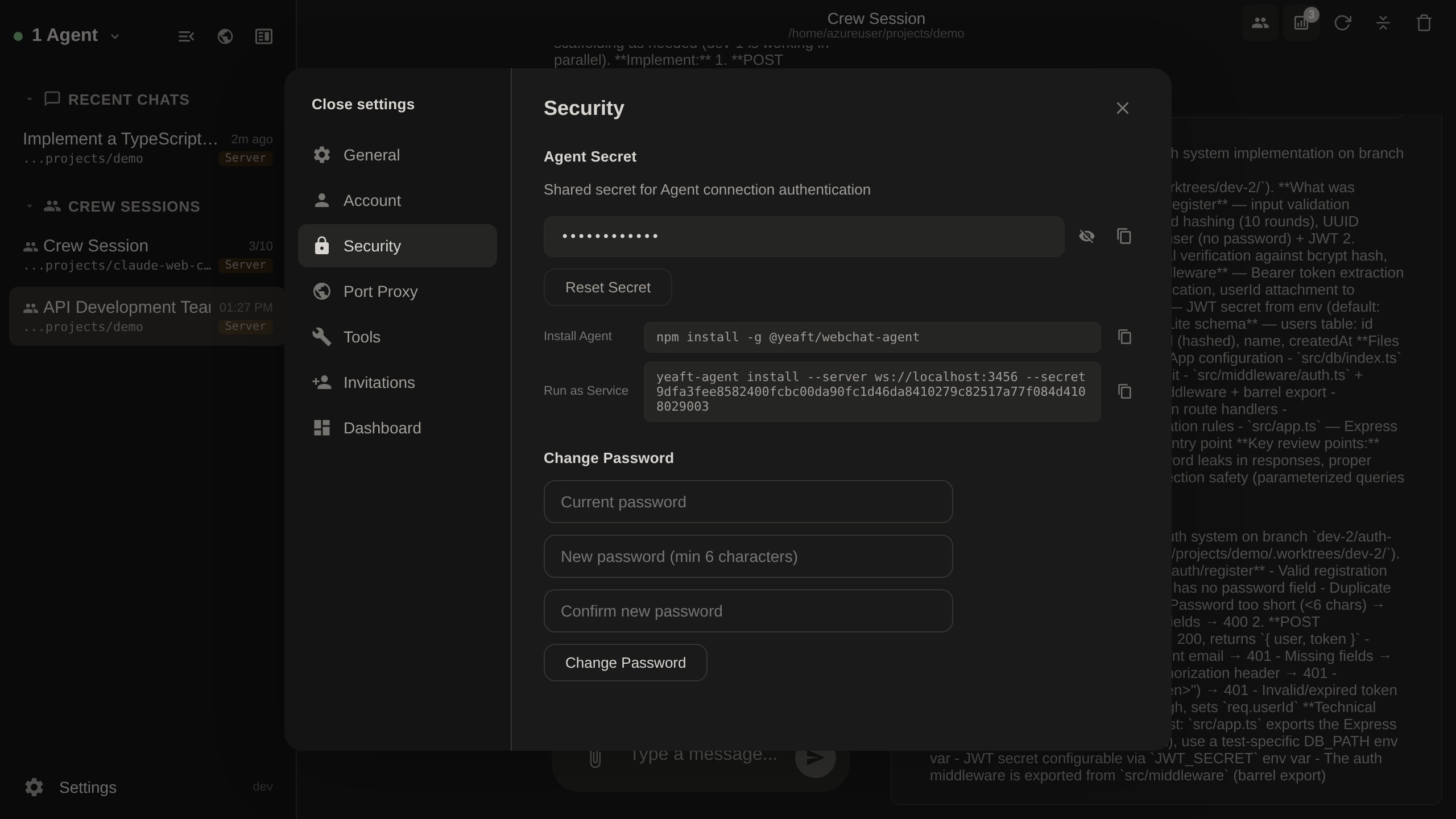
Finding the Agent Secret
You can find the Agent secret in Settings > Security within the web interface:
When no Agent is connected, the welcome page guides you to Settings:
Verify the Backend Is Available
After the Agent connects, open the web UI and start a new session:
- Claude Code option missing →
claude --versiondoesn't work on the agent machine, or the CLI isn't logged in - Copilot option missing →
copilot --versiondoesn't work on the agent machine, or Copilot CLI isn't authenticated - Yeaft Code Agent option always available — the engine is bundled, but the selected Agent instance still needs at least one provider in its resolved
config.json
For Yeaft engine setup, jump to Yeaft Engine Config.