Yeaft Sessions and Projects
A Session is the native Yeaft engine's only conversation and collaboration unit. It always has the same shape: one durable timeline and a roster of 1..N VPs. One VP gives you a focused code agent; several VPs let you direct the same turn to independent roles.
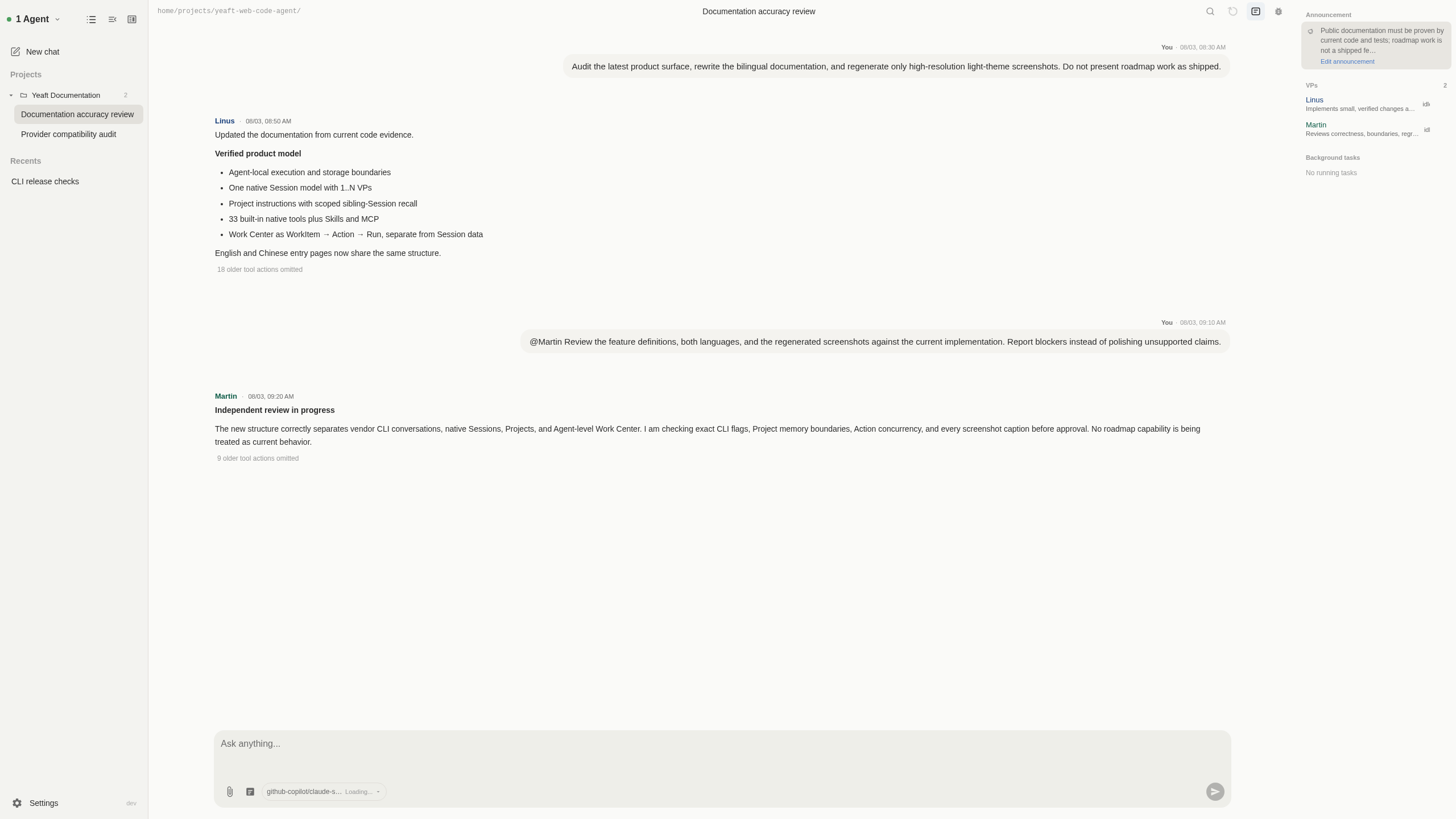
Session contents
A Session stores and exposes:
- an Agent owner and stable Session ID;
- a name, working directory, announcement, and creation/activity metadata;
- a VP roster and default VP;
- an optional Session-level model and reasoning-effort override;
- durable messages, per-VP turns, tool results, background task state, and debug traces;
- Session-scoped and nested VP/user memory.
Session metadata and history live under the owning Agent's Yeaft directory. workDir is execution context and the root for project-tier instructions, Skills, and MCP discovery; it is not the Session data directory.
Create a Session
- Choose New chat in the unified sidebar and select Yeaft as the runtime.
- Select the Agent that owns the working directory.
- Set a Session name and working directory.
- Choose one or more VPs and a default VP.
- Create the Session.
- After creation, choose model/effort in the composer and edit the announcement in Session settings, then send a message.
When the roster is omitted and the Agent's VP library contains omni, the runtime can use Omni, the all-purpose assistant (Chinese name: 全能助手), as the default generalist. Its internal ID remains omni, so existing references keep working. An explicitly non-empty roster is never silently replaced.
The assistant helps with questions, research, writing, translation, learning, planning, data analysis, and coding tasks—not just clarification or handoffs. It chooses direct answers, tools, or collaboration to suit the task while respecting project ownership and authorization. At Agent startup, exact historical stock souls and their matching old name, role, and description are upgraded; user-edited souls and custom metadata are preserved.
Fork the current Session
Choose Copy session from the active Session’s sidebar menu, or the copy icon at the top right of the conversation. No setup dialog is needed: the new Session opens automatically on the same Agent.
The fork copies the complete persisted conversation, announcement, VP roster/default VP, working directory, and Session model/effort overrides. If the source belongs to a Project, the Server puts the fork in the same Project, so the shared instruction continues to apply. The source remains unchanged; later conversation and Session setting changes are independent.
A supporting Agent can fork while responding: the new Session contains the complete durable history before the active input, excluding that input and its response or tools, without stopping the source. Overlapping inputs or parallel VPs use the safe prefix before the earliest active input. Older Agents still require the response to finish. Forking is unavailable while disconnected or another fork is pending. Background processes, running tasks, debug traces, and Session memory files are not cloned. Available uploaded attachments are copied into the new Session’s own storage; missing or inaccessible legacy files remain explicitly unavailable. Both Server and Agent must support Project inheritance for this behavior.
Choose Fork from this turn below a completed AI response to copy the chronological history prefix through that turn, inclusive, without later messages. The new Session inherits the same configuration and Project; the source is never truncated or changed. This requires a supporting Agent. Older responses without a reliable turn ID have no action; ambiguous boundaries or boundaries that split a tool call/result are rejected rather than falling back to a full copy. With parallel VPs, persisted message order is authoritative, so other VP messages before the boundary are included.
Merge two Sessions
Choose Merge Sessions from the sidebar menu or conversation header, then select another native Session on the same Agent. Both Sessions must be idle and the Agent must support merging.
Merging opens a new Session and leaves both sources unchanged. The new Session inherits the initiating source's working directory, announcement, default VP, model settings and Project, with a union of both VP rosters. Shared history is retained once; remaining whole request turns are ordered by the user's sent time. Without shared history, all turns are time-ordered. Identical prompt text alone is never treated as shared history; ambiguous divergence is rejected rather than guessed. Tool calls and results stay together.
Attachments are verified and copied into the new Session's storage. Conflicting shared attachment bytes or entirely unavailable copies cause an explicit failure, not silent loss. This does not merge Git files or migrate running tasks. Project ownership remains Server-authoritative.
Forks and merged Sessions continue from canonical text and tool history, not provider-private signatures or reasoning continuation bound to a source Session. Source transcripts remain intact. Historical Fork from this turn also works while a later response is running, provided the selected endpoint precedes the active input; the current response has no fork action.
Route a turn
A message without mentions goes to the default VP. Use @VPName to address a subset:
@Linus Implement the smallest safe fix and add focused tests.@Martin Review the current diff for correctness, regression risk, and missing tests.@Linus @Martin Compare the implementation and review perspectives in parallel.When several VPs are selected, Yeaft persists one canonical user message and fans the turn out to independent VP engines. Each VP has its own persona and memory view, streams its own response, and uses the current Session's allowed tools. The shared timeline keeps speaker identity visible.
Planning and progress
The native engine no longer provides TodoWrite or StartPlan. It does not require repeated checklist updates or an extra planning-tool call just to display progress. Neither the tool registry nor DiscoverTools exposes these tools.
You can still ask a VP to “investigate and propose an approach without changing code,” using ordinary replies to discuss goals, constraints, risks, and validation. There is currently no dedicated Plan Mode switch; a conversational request is not a read-only filesystem sandbox.
Existing Session checklists remain replayable, and Claude Code / Copilot CLI tool behavior is unchanged. Use Work Center for durable cross-turn execution state and acceptance checks. Custom Project instructions, VP souls, and planInstruction data are not rewritten automatically; update any custom instructions that still require the retired tools.
Handoffs and sub-agents
Multi-VP collaboration is explicit:
RouteForwardsends a message to another VP in the same Session and records the route in the visible VP turn.- Sub-agents are child workers created by a VP for bounded parallel research, implementation, review, or exploration.
- Background shell jobs and sub-agents have persistent Session-scoped task records; the parent can list, inspect, cancel, or consume their terminal result.
A text @mention written by a VP is not a runtime handoff. VP-to-VP transfer must use RouteForward.
Session history and status
The Yeaft page provides:
- a paged, virtualized conversation timeline;
- history outline and text/speaker search;
- per-VP turn blocks and message quote/edit-as-new actions;
- Session status with announcement, roster, and active background tasks;
- model/effort selection in the composer;
- an optional debug panel for provider requests, tools, tokens, and stop reasons. Dream events and settings are not exposed.
Debug output can contain project text and tool results. It is for the current owner and should not be exported or shared casually.
Images in responses
Tool images appear as compact thumbnails between response text segments. Click to enlarge and browse the other images in that response. Newly generated Yeaft images stay anchored to their source tool even when the upload finishes after later text or history is reloaded. Older images without source metadata retain their existing position rather than guessing which text they belong to.
Answer AskUser questions
A VP's AskUser call appears as an interactive card. You can switch Sessions and return to answer while the request remains active on the Agent.
- Submitting shows “Waiting for Agent confirmation,” not success. The success summary appears only after an Agent acknowledgement or persisted answer history arrives.
- If confirmation has not arrived after 15 seconds, check the connection and use Resend answer. A resend retains the original question identity and does not complete the same question twice.
- An unavailable Agent produces a retryable notice. If the question expired, execution was cancelled, or an Agent restart lost the waiting request, ask the VP to pose the question again. Resending does not revive an ended turn.
Organize Sessions with Projects
Projects are user-visible groups in the unified sidebar. You can:
- create, rename, and delete a Project;
- drag native Yeaft Sessions between a Project and Recents;
- reorder Sessions without losing cross-Agent identity;
- attach one Project instruction to the Project.
A Project does not merge Session transcripts or storage. It supplies Project instructions to members, but the current runtime does not recall or inject sibling Session summaries.
Memory boundaries
Dream/H2-AMS memory is retired from the active runtime:
- native turns use only the bounded history window selected from the current Session transcript;
- legacy memory files and indexes remain on disk but are not read, migrated, synchronized, recalled, or injected;
- historical messages and ordinary debug records are retained;
- post-turn compact remains a separate history-window feature.
Legacy enable/manual Dream commands report that the feature is disabled. There is no Dream debug tab or settings control.
Move durable work to Work Center
Use Create WorkItem from the Session composer when the goal needs role handoffs, waiting, retry, review, or execution beyond the current turn. The runtime stamps the source Session identity and creates an Agent-level WorkItem; Work Center then owns its contract, Coordinator conversation, Action graph, Runs, and recovery.
See Work Center.
Boundaries to remember
- Yeaft has Sessions, not separate native chat/group modes.
- A VP model setting is currently a
primaryorfasthint; the Session can override an exact provider/model and effort. - The native tool registry is shared by the engine and filtered by policy; tool availability is not a separate mode switch.
- Projects organize and provide bounded context. They are not repositories, worktrees, or a second memory owner.
- Work Center is Agent-level durable execution, not another Session.
Related pages
- Choose a code agent path
- Provider and model configuration
- Yeaft engine internals
- Retired H2-AMS implementation
Images and model vision
Native Yeaft Sessions send supported image attachments directly to vision models with the user message; ViewImage is not required. Follow-up turns and restored Sessions reload selected historical images from this instance’s Session-scoped files. Missing files or budget-omitted images are marked explicitly; a visible thumbnail does not mean the model still has the image. ViewImage reads local files and returns native multimodal tool input, without requiring cropping or OCR first. New attachments live under the instance’s Session data root, independently of the Agent launch directory.